
If you’ve followed the directions that we posted in our previous posting on Sitemaps for Google Sites and you find that the sitemap is empty (not missing but actually empty) then you’ll need to follow these steps to get your sitemap completed:
- Go to Google Webmaster Tools (http://www.google.com/webmasters/tools/) and create an account if you don’t already have one.
- “Add a Site” using the information from your current website
- Choose to verify your site using the Meta tag

- Copy the provided Meta Tag information into the “Google Webmaster Tools verification” field in the General Site Settings portion of the “Manage Site” admin page.
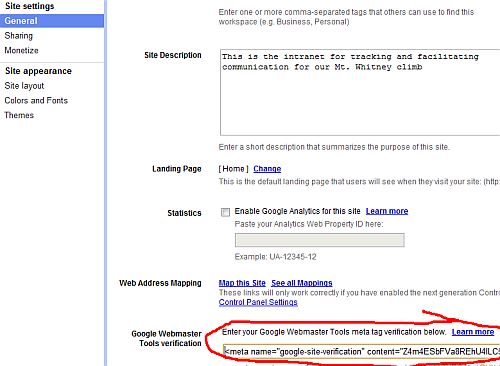
- Go back to Google Webmaster Tools and verify the site
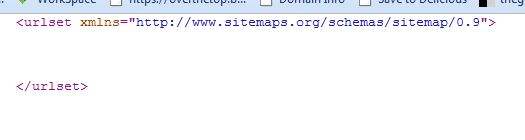
At that point, (or shortly thereafter) you’ll find that your sitemap is no longer empty! It should not look like this:
Please use the comments below if you have and valid comments or questions about this technique!

I'm a technologist at heart, assisting companies best utilize the Internet to market themselves and sell their products and services online. This includes organizations as large as Google and as small as one or two individuals.
At Over The Top and Exhibit A Communications, I've programmed solutions for Google as well as at least one other company that was later acquired by Google.
I've been CTO of an Internet SaaS company and spent my time pretty evenly between guiding the future technical strategy of the company, architecting software solutions for my dev teams, designing and running a data center to service our clients world-wide as well as being a technical evangalist/sales engineer to our media clients large and small.
I've also been Chief Photographer of the Daily Sun/Post newspaper back when it was a 5-day a week daily newspaper.
I also spent a great many years as a beach lifeguardfor the City of San Clemente as well as Jr. Lifeguard instructor and then as it's program coordinator.
Bragging rights
Private Pilot with Instrument rating and proud husband of soon to be 25 years (and counting).
At Over The Top and Exhibit A Communications, I've programmed solutions for Google as well as at least one other company that was later acquired by Google.
I've been CTO of an Internet SaaS company and spent my time pretty evenly between guiding the future technical strategy of the company, architecting software solutions for my dev teams, designing and running a data center to service our clients world-wide as well as being a technical evangalist/sales engineer to our media clients large and small.
I've also been Chief Photographer of the Daily Sun/Post newspaper back when it was a 5-day a week daily newspaper.
I also spent a great many years as a beach lifeguardfor the City of San Clemente as well as Jr. Lifeguard instructor and then as it's program coordinator.
Bragging rights
Private Pilot with Instrument rating and proud husband of soon to be 25 years (and counting).
Latest posts by Michael Gibbs (see all)
- Setting up SSL on Amazon Linux Instance under EC2 - July 26, 2018
- Method Chaining of Objects in C# - January 16, 2017
- Native SQL Backup And Restores on AWS RDS - November 9, 2016