
Vanilla Gorilla has always had one small, gorilla-sized flaw. To change one word on your website, you needed a code editor, a GitHub account, a working knowledge of Markdown, and the emotional resilience to learn what a "commit" is.
For a developer, that's a Tuesday. For someone who just wants to post a new painting, it's a hostage situation.
So today we're launching Gorilla To Go (GTG for short): a small app that lets you add, edit and delete pages on your Vanilla Gorilla site from your phone. No laptop. No terminal. No staring at front matter wondering why a colon ruined your afternoon.
Why This Exists
It started with a simple goal: give my artist partner a website they could update without calling me.
So I went shopping for a Markdown editor. I found many. Some wanted a monthly subscription for the privilege of typing asterisks. Some wanted you to sync a vault, install three plugins and pick a theme before you could write a sentence. Some were lovely on a desktop and turned into keyboard whack-a-mole on a phone. And not one of them knew what a Vanilla Gorilla site was, let alone how to publish one.
Vanilla Gorilla exists because I got tired of tools that make simple things complicated. It would be a bit rich to then turn around and tell an artist, "Easy! Just clone the repo." So I built the missing piece instead.
What It Does
- Add a page. Give it a title, pick a blog post, page or gallery, and write.
- Edit a page. Fix the typo everyone else already noticed.
- Delete a page. We don't judge. Much.
- Add images. Because a gallery with no pictures is just a very sad list.
- Manage many sites. One website is never enough. Ask anyone who owns domain names they "might use someday."
- See what happened. After you save, GTG tells you if your change is Publishing, Live or Build failed. Honest. Occasionally brutal.
- Light and dark themes. GTG follows your phone's setting, with a toggle for when you disagree with your phone.
How It Works (No Magic, Sorry)
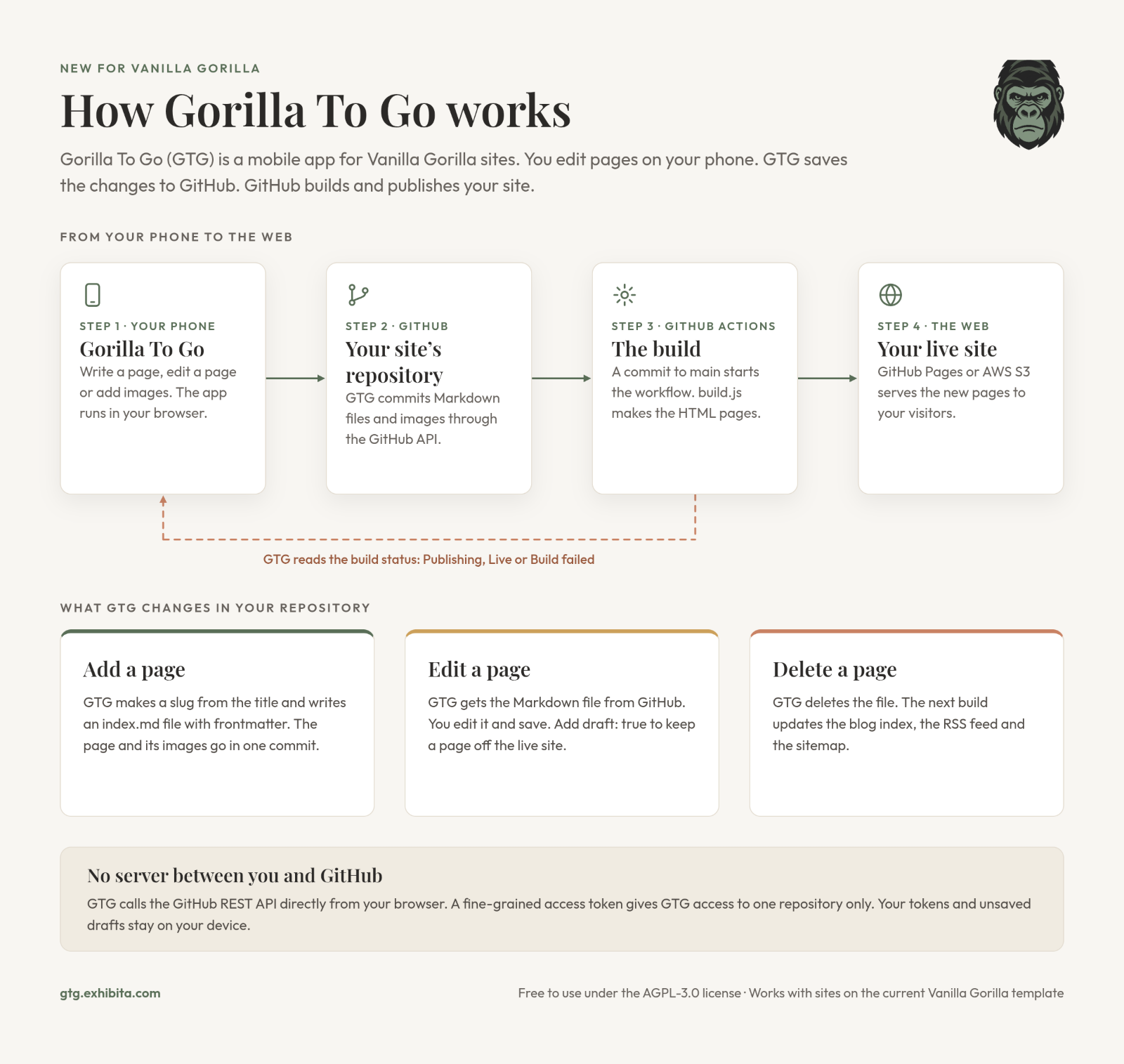
Under the hood, GTG is deliberately boring, which is the highest compliment we give around here.
When you save, GTG commits the change directly to your site's GitHub repository. GitHub Actions runs build.js, exactly like it always has. Your host (GitHub Pages or AWS S3) serves the new version. GTG then reads the build status and tells you how it went.
There is no Gorilla To Go server in the middle. No account to create with us. No database full of your stuff. Nobody in a hoodie to get acquired. You connect with a fine-grained GitHub access token that works on one repository only, and your token and unsaved drafts stay on your device.
No App Store Required
GTG is a progressive web app. Open gorillatogo.app on your phone, add it to your home screen, and you're done. No app store, no review queue, no "please rate us 5 stars" pop-ups.
What You Need
- A site on Vanilla Gorilla template version 2 or later. Older site? GTG checks your site when you add it and shows you how to upgrade.
- A fine-grained GitHub access token for that site's repository. GTG has step-by-step instructions for this too.
- A phone. Or, honestly, anything with a modern browser.
Free, Open and a Little Stubborn About It
Gorilla To Go is free to use under the AGPL-3.0 license. It's the same philosophy as Vanilla Gorilla: plain web standards, no framework tax, and your content stays in your repository, where it belongs.
What's Next
This first release is the essentials. Here's what's on the list:
- Links pages. Support for the new Vanilla Gorilla Links page type.
- Guided onboarding. A walk-through for genuinely non-technical people: create a GitHub account, sign in and set up a first site, all from the app.
- Hands-free upgrades. GTG updating your site's template for you, so "upgrade" stops being a scary word.
Until then: go forth and publish from the couch. The gorilla's got it from here. 🦍