
The forms built into Google Docs are handy devices. We’ve talked before about how easy it
is to create a form and have the resultant data stored in a Google Docs spreadsheet for
later use but many people are looking for more immediate gratification.
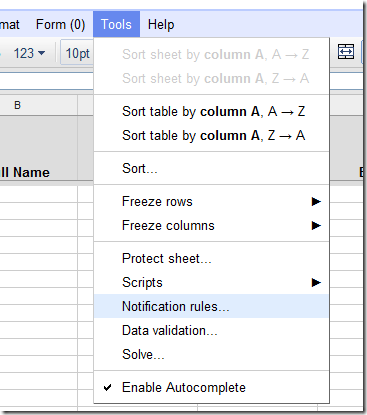
It is a little buried, but Google does make it fairy easy to do this Anyone who has
access to view the spreadsheet behind the form can go the Tools menu and select
Notification Rules.
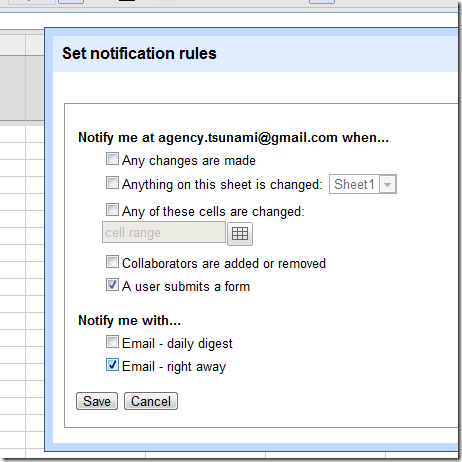
The next step is to click that you want to be notified when “A user submits a form” and
Notify me with “Email – right away”.

Once you’ve saved this, you’ll be receiving your emails right away!
I'm a
technologist at heart, assisting companies best utilize the Internet to
market themselves and sell their products and services online. This
includes organizations as large as Google and as small as one or two
individuals.
At Over The Top and Exhibit A Communications, I've
programmed solutions for Google as well as at least one other company
that was later acquired by Google.
I've been CTO of an
Internet SaaS company and spent my time pretty evenly between guiding
the future technical strategy of the company, architecting software
solutions for my dev teams, designing and running a data center to
service our clients world-wide as well as being a technical
evangalist/sales engineer to our media clients large and small.
I've also been Chief Photographer of the Daily Sun/Post
newspaper back when it was a 5-day a week daily newspaper.
I
also spent a great many years as a beach lifeguardfor the City of San
Clemente as well as Jr. Lifeguard instructor and then as it's program
coordinator.
Bragging rights
Private Pilot with Instrument
rating and proud husband of soon to be 25 years (and counting).
Latest posts by Michael Gibbs
(see all)